
Free vs Paid Digital Signage Software: What You Actually Give Up
Free digital signage software is genuinely good enough for a lot of businesses. This is an honest breakdown of what you give up, what open source really costs in staff time, and the exact point where paying wins.
On this page
We sell paid digital signage software, so treat this article accordingly. It would be easy to write a piece concluding that free options are inadequate. They are not. For a meaningful number of businesses, free is genuinely the right answer, and this is an attempt to say honestly which businesses those are.
What follows: the three quite different things people mean by "free", what each actually costs, and the specific point at which paying becomes the cheaper option.
The three kinds of "free" (they are not the same)
Most confusion in this comparison comes from treating three very different models as one category.
1. Free tiers of commercial platforms
A commercial cloud platform gives away a limited version permanently — typically one to three screens with the core playback features, hoping you will grow into a paid plan.
What you get: the real product, hosted and maintained by the vendor, with the same players and the same reliability as paying customers. Updates, security patches and infrastructure are somebody else's problem.
What limits you: the screen count, and usually the features that only matter once you have more than one screen — scheduling depth, screen groups, team roles, reporting, priority support.
The catch to check: whether it is genuinely permanent or a trial with a friendly name, and whether the free tier includes offline caching. A free tier whose screens go blank when the network drops is not a viable production setup at any price.
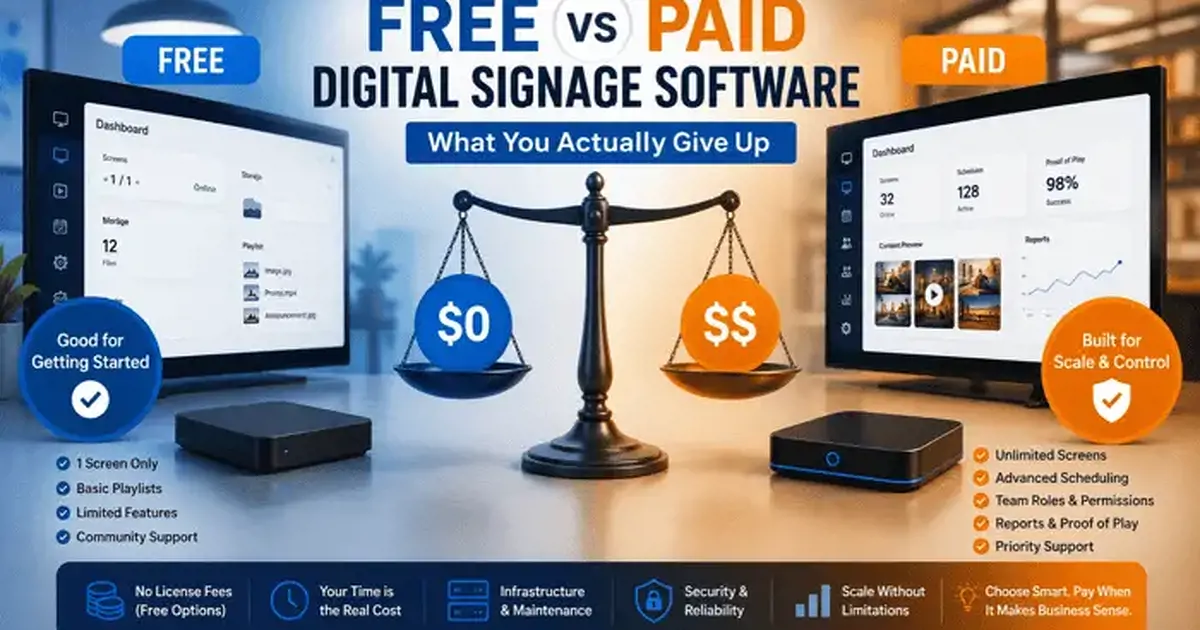
For reference, Qmanja Signage's free tier is one screen, permanent, no card, and includes playlists, live streams, the clock, weather and ticker widgets, transitions, rotation and offline caching. What it does not include is split-screen layouts, video walls, scheduling, team roles and proof-of-play — the multi-screen operational features.
2. Open-source, self-hosted
Projects with no licence cost that you install and run on your own infrastructure. Several mature options exist with long histories and real communities.
What you get: no licence fee, no screen limit, full control of your data, and the ability to modify the software. For an organisation with a hard requirement that content never leaves its own network — some government and healthcare contexts — this is sometimes the only acceptable model.
What you take on: a server, backups, updates, TLS certificates, security patching, player compatibility testing, and every problem at 7am on a Saturday.
The honest framing: open source is not free, it is unbundled. You have swapped a predictable subscription for your own staff time. Whether that is a good trade depends entirely on what that time is worth and whether you have it.
3. Trials dressed up as free plans
Marketed as free, expires in 14 or 30 days. Not a free plan, and worth identifying early so you do not build a deployment on it.
The tell is in the sign-up flow: a card requested up front, a countdown in the interface, or the word "free" never appearing on the pricing page next to a $0 column. Trials are perfectly legitimate — just do not confuse one with a free tier when you are planning.
What you actually give up on a free plan
Free tiers withhold features fairly predictably, because vendors withhold the features that only become necessary at scale.
| Capability | Typically on free tiers | Why it is withheld |
|---|---|---|
| Image and video playlists | Included | Core function — withholding it makes the tier pointless |
| Live streams and web sources | Usually included | Cheap to serve when played from the source |
| Offline caching | Usually included | A property of the player, not a server cost |
| Multiple screens | No — this is the limit | The whole basis of per-screen pricing |
| Day and time scheduling | Rarely | Only matters once content must change unattended |
| Screen groups | No | Meaningless with one screen |
| Split-screen layouts | Sometimes | Varies most between vendors |
| Team roles and scoping | No | Only matters with more than one person |
| Proof-of-play reporting | No | Real storage and processing cost |
| Offline alerts | Rarely | Operational feature for unattended estates |
| Support beyond community | No | Human time is the most expensive thing a vendor gives away |
Read that table as a description of when free stops working. Every withheld feature is one that becomes necessary at a specific, recognisable moment — the second screen, the second person, the first schedule that has to change itself.
The true cost of self-hosting
The licence is $0. Here is what is not.
- Server. A small cloud VM plus storage and bandwidth: roughly $20–$80 a month for a modest estate, more if you serve a lot of video.
- Initial setup. Installation, TLS, database, storage, player testing across your device types. Realistically 8–20 hours for someone competent who has not done it before.
- Ongoing maintenance. OS patching, application updates, certificate renewal, backup verification. Two to four hours a month if nothing goes wrong.
- Incident response. When the server is down, every screen is down, and you are the support team. This is the cost that is impossible to schedule and easy to underestimate.
- Player compatibility. A device firmware update breaks something, and finding out is your job. Commercial vendors absorb this across their whole customer base.
- Security. An internet-facing server with a media library and an admin interface is something you now own responsibility for.
At a conservative $40 an hour for internal technical time, ongoing maintenance alone is $80–$160 a month before the server bill, before any incident, and before the initial build. For five screens that is more than most commercial platforms charge for the same five screens with somebody else on call.
The maths inverts at scale. At two hundred screens, the same maintenance effort spread across two hundred screens is a fraction of two hundred subscriptions — which is precisely why large organisations with existing infrastructure teams do self-host, and why small ones almost never should.
When free is genuinely the right answer
Not a hedge. These are real situations where paying is the wrong call.
One screen, and one is genuinely enough. A single café menu board, a single window display, a single reception screen. If the content is managed by one person and never needs to change on a schedule, a free tier does the entire job permanently. Paying adds nothing.
You are evaluating. Run a real screen on a free tier for a month before spending anything. This is strictly better than a demo and strictly better than a 14-day trial you have to rush.
A pilot before a rollout. Prove the concept on one screen, get internal agreement, then buy for the real deployment.
You already run infrastructure and have hundreds of screens. Self-hosting genuinely wins here on economics, and you have the team to absorb the operational cost.
Data residency is a hard requirement. If policy or regulation says content cannot leave your network, self-hosted may be the only compliant option regardless of cost.
The specific point where paying becomes cheaper
Not a philosophy question. It is arithmetic, and there are four thresholds.
Threshold 1: the second screen. The most common and the most concrete. Free tiers cap at one screen, so a second screen forces the decision. At typical rates a second screen costs less than $10 a month — roughly fifteen minutes of anyone's time.
Threshold 2: the first schedule that has to change itself. The moment somebody has to remember to swap content at 11am, you are paying in staff time and reliability. Ten minutes a day is roughly 40 hours a year; at $20 an hour that is $800 to avoid a $120 subscription. And it will be forgotten — that is the actual cost.
Threshold 3: the second person. One person managing screens needs no permission model. Two people need to know who can change what, and a shared login is not an answer — it removes accountability and creates a credential nobody can rotate.
Threshold 4: the second location. Managing screens at a site you are not standing in requires remote status, offline alerts and grouped publishing. Without them, you find out a screen is blank when a customer mentions it.
Reduced to a rule of thumb: three to five screens, or the second location, or the first automated schedule — whichever comes first. Below that, free is genuinely fine. Above it, the subscription is cheaper than the status quo, and the comparison is not close.
Four worked examples
The thresholds above are abstract. Here is what they look like applied to real situations, with the arithmetic shown.
A single independent café
One menu board above the counter. The owner updates it when prices change, perhaps six times a year. No scheduling — the menu is the menu all day.
Verdict: free tier, permanently. A paid plan would add scheduling they do not need and a second screen slot they will not use. The correct spend is zero, and it stays zero until they open a second site or start running a separate breakfast menu.
A takeaway with three screens and dayparting
Three menu boards, a breakfast menu until eleven and a main menu after. Currently someone changes the boards manually every morning, which takes about ten minutes and gets forgotten roughly one day in ten.
The arithmetic: ten minutes a day is 60 hours a year. At $18 an hour that is $1,080 of staff time, plus roughly 36 mornings a year showing the wrong menu during the breakfast rush. Three screens at $5 per screen per month is $180 a year.
Verdict: pay, comfortably. The subscription costs about a sixth of the labour it removes, and the reliability improvement is the larger benefit.
A six-store retail group
Twelve screens across six stores. A head-office marketing person runs campaigns; store managers want to promote local events.
Why free does not work here: not the screen count — it is the permission model and the remote visibility. Without scoped roles, either head office does everything (and local content never happens) or everyone shares a login (and nobody is accountable). Without offline alerts, a blank screen in store four is discovered by a customer.
Verdict: pay. Twelve screens at $5 is $720 a year, against a marketing person's time and the cost of campaigns that silently did not run.
A university with 180 screens and an IT team
Existing virtualisation infrastructure, a systems team, a hard preference for keeping data on-premises, and enough screens that per-screen pricing is a real number.
The arithmetic: 180 screens at $5 is $10,800 a year. Self-hosting costs a server, perhaps four hours a month of maintenance, and the initial build — call it $6,000–$8,000 a year fully loaded, plus the risk that a single server outage takes down every screen on campus at once.
Verdict: genuinely close, and self-hosting is defensible. This is the case where open source wins, and it wins because the fixed operational cost is spread across 180 screens rather than three. Note that the decision flips back if the IT team's time is scarce, or if the institution wants the vendor to be accountable for uptime.
The costs nobody puts in the comparison
Three things sit outside both columns and often matter more than the licence.
Hardware is the real capital decision. Software is a subscription you can cancel in an afternoon. Two hundred proprietary media players are a five-year commitment you cannot repurpose. This is why the free-versus-paid question matters less than it appears, and why standardising on commodity players is the higher-leverage choice.
Content production is the recurring cost. Whatever you pay for software, somebody has to make the content and keep it current. In most deployments this exceeds the licence cost by a wide margin, and it is the line item that decides whether the screens are still useful in year two. Budget it explicitly.
Downtime has a price, and it is asymmetric. A blank menu board during a Saturday lunch rush costs more than a month of subscription. On a free tier or a self-hosted install, you are the person fixing it, at the time it happens. That is not an argument against either — it is an argument for knowing what the exposure is before you choose.
Side-by-side comparison
| Free tier | Open source, self-hosted | Paid cloud | |
|---|---|---|---|
| Licence cost | $0 | $0 | $8–$30 per screen/month |
| Infrastructure cost | None | $20–$80+/month | None |
| Setup effort | Minutes | 8–20 hours | Minutes |
| Ongoing maintenance | None | 2–4 hours/month | None |
| Screen limit | 1–3 | Unlimited | Unlimited |
| Scheduling | Rarely | Usually | Yes |
| Team permissions | No | Varies | Yes |
| Reporting | No | Varies | Yes |
| Support | Community | Community | Vendor |
| You own uptime | No | Yes | No |
| Best for | 1 screen, pilots, evaluation | 200+ screens with an IT team, or strict data residency | 2–200 screens, most businesses |
How to avoid getting locked in either way
Whichever route you take, keep the exit cheap. Three habits do most of the work.
Keep your source media outside the platform. Your own cloud storage or file server holds the originals. The signage platform gets copies. Then switching costs you an upload, not a rebuild.
Ask about export before you sign up, not after. "How do I get my content and layouts out if I leave?" is the single most informative question you can ask a vendor, and the answer tells you how confident they are that you will want to stay.
Prefer platforms that run on hardware you own. This is the real lock-in risk. Software you can leave in an afternoon. Two hundred proprietary media players you cannot use with anything else is a capital decision that outlives the contract — which is a good reason to standardise on Android TV, Fire TV or commercial Tizen and webOS panels that any platform can drive.
The honest recommendation
If you have one screen and expect to keep having one screen, use a free tier and do not spend money. That is not a concession — it is the correct answer, and any vendor telling you otherwise is selling.
If you have an infrastructure team and hundreds of screens, cost out self-hosting properly, including incident response, and it may well win.
Everybody in between — which is most restaurants, shops, clinics, offices and schools — will find that a per-screen subscription costs less than the staff time it replaces, usually by a wide margin, from about the third screen onwards.
Start free and find out. Qmanja Signage is genuinely free for your first screen, permanently, with no card — including offline caching, live streams and the core widgets. If you outgrow it, the paid plan adds scheduling, split-screen layouts, video walls, team roles and proof-of-play at a single per-screen price with no per-feature add-ons. The buyer's guide covers how to compare it against anything else.


